---
title: How to use Resume Optimizer
description: The Resume Optimizer will allow you to get resumes tailored to the specific role you are applying to.
---
[Skip to content](https://help.teamsidebar.com/how-to-use-resume-optimizer#main-content)
English
Show submenu for translations
Open main navigation
Close main navigation
- English
Show submenu for translations
- [Contact us](mailto:hello@superinterviews.com)
[Contact us](mailto:hello@superinterviews.com)
How can we help you?
- There are no suggestions because the search field is empty.
1. [Sidebar Member Knowledge Base](https://help.teamsidebar.com/?hsLang=en)
2. [Getting started](https://help.teamsidebar.com/getting-started?hsLang=en)
# How to use Resume Optimizer
## The Resume Optimizer will allow you to get resumes tailored to the specific role you are applying to.
Before using the Resume Optimizer, you will need to [upload your LinkedIn profile through the LinkedIn Optimizer](https://help.teamsidebar.com/how-to-optimize-your-resume?hsLang=en). You will also need to have uploaded a job description. Working with the AI Coach to optimize your LinkedIn profile before using the Resume Optimizer is recommended.
###### Select the Role
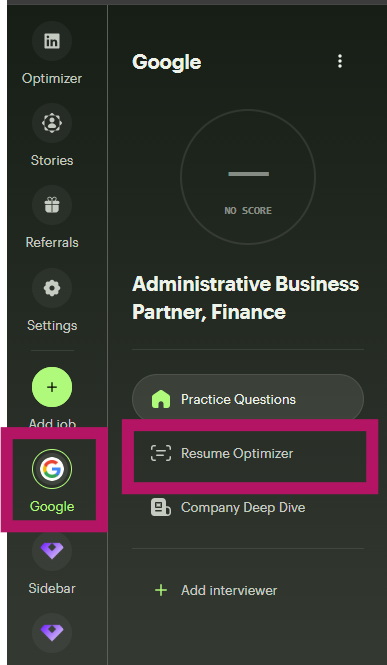
From the left sidebar, select the role you would like to tailor your resume towards. In this case the role is at Google.
###### Start AI Analysis

Select Start Analysis and give the AI Coach a minute to analyze your resume and the role. You will be able to review the findings of the AI Coach.

Select Create Resume to get your custom resume. The AI tool will create a resume ready for you to copy and paste into your preferred format.
- [Getting started](https://help.teamsidebar.com/getting-started?hsLang=en)
- Home
- Products
- Pricing
- Blog
- Company
# Sidebar
[mailto:email@email.com](mailto:email@email.com)
Copyright © 2026, Sidebar